
Free, private voice calling guides
Private voice calling, explained country by country
CallGuide explains how to make free voice calls without an account or a phone number, with advice that fits where you live.
Each country has its own guides, because the rules, scams and networks you deal with in the United States, India, Canada and the United Kingdom are not the same. Pick your country above, or start from your situation below.
Start with your situation
I'd rather not share my phone number
- How to Call Someone Without Sharing Your Phone Number (United States)
- How to Call Someone Without Sharing Your Number in India (India)
- How to Call Someone Without a Phone Number in Canada (Canada)
- How to Call Someone Without Giving Your Mobile Number (UK) (United Kingdom)
I need a free call with no account
- Free Call Online With No Sign-Up (US Guide) (United States)
- Free Voice Call Online With No Sign-Up (India Guide) (India)
- Free Online Voice Call With No Account (Canada Guide) (Canada)
- Free Online Voice Call With No Sign-Up (UK Guide) (United Kingdom)
I'm calling family abroad
- Call Family Abroad From the US for Free (United States)
- Call Family Abroad Free From India (India)
- International Students and Newcomers: Calling Home From Canada (Canada)
- Call Family Abroad From the UK for Free (United Kingdom)
I'm dealing with a buyer, seller or landlord
- Call a Buyer or Seller Without Sharing Your Number (India)
- Call a Landlord or Seller Without Giving Your Number (Canada)
- Call a Landlord, Agent or Seller Without Giving Your Number (United Kingdom)
I work with clients
- How Freelancers Can Call Clients Without Their Personal Number (United States)
- Freelancer and Client Calls Without Exposing Your Number (India)
I'm on public or shared Wi-Fi
- How to Make Calls on Public Wi-Fi Safely (United States)
- Private Calls on Shared Wi-Fi in Hostels, PGs and Offices (India)
- Making Calls on Train, Station and Cafe Wi-Fi Safely (United Kingdom)
I want to know how private or safe it is
- Is Browser Calling Private? A Plain-English Guide (United States)
- Is Browser Calling Safe? A Plain-Language Guide for India (India)
- Call Privacy in Canada: What to Know (Canada)
- Is Browser Calling Private? A UK Guide to Data and Recording (United Kingdom)
I'm comparing tools
- GhostCall vs. Google Voice: Which Should You Use? (United States)
- GhostCall vs. WhatsApp for Calls in India (India)
- GhostCall vs. WhatsApp for Calls in Canada (Canada)
- GhostCall vs. FaceTime: Which to Use for Calls in the UK? (United Kingdom)
I got a suspicious call
- How to Spot and Handle Scam Calls in the UK (United Kingdom)
- Is Browser Calling Safe? A Plain-Language Guide for India (India)
How calling without an account works
Most calling apps are built around your phone number or an account. Browser-based tools work differently. One person starts a call and gets a link or a short code, shares it through any app, and the other person opens it. Both browsers then connect and exchange audio, using a standard called WebRTC that encrypts the call in transit.
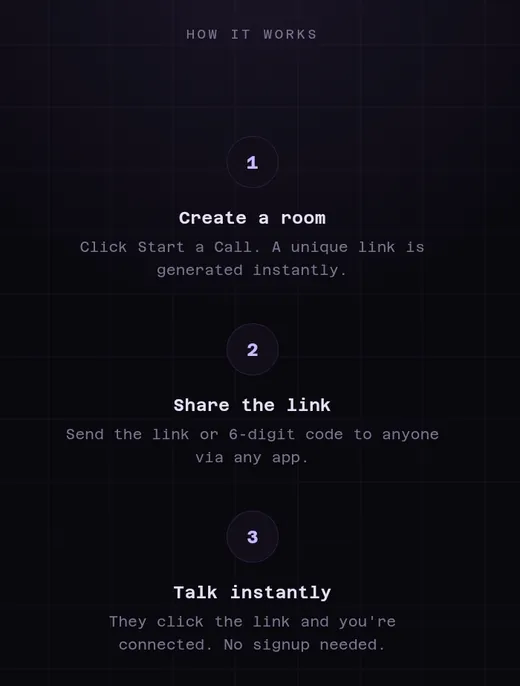
Because nothing is tied to a phone number, there is no number to hand over, no contact list to upload, and nothing to sign up for. GhostCall, the tool these guides use as an example, follows exactly this pattern: create a room, share the link or 6-digit code, and talk.
What to know before you rely on it
- Both people need to be online. Browser calling can't dial ordinary phone numbers.
- Your IP address can be visible. In a direct peer-to-peer connection the other person's browser can see it. A VPN helps if that matters to you.
- Encryption doesn't stop recording. Anyone on a call can record it, so only say what you'd be comfortable having recorded.
- Keep your screen open on a phone. GhostCall notes that background calls aren't supported yet, and that it is in early access, so a call may occasionally fail.
- Scammers use calls too. Never share OTPs, PINs or card details with someone who contacts you.
How these guides are written
Every guide answers one specific question and says plainly what a tool can't do as well as what it can. Local details, such as scam patterns, recording rules and network conditions, are included only where they differ by country. CallGuide is a project by GhostCall, and the guides say so wherever GhostCall is mentioned.
The guides are general information, not legal or professional advice. If something looks out of date or wrong, please tell us through the contact page.
Common questions
What is CallGuide?
CallGuide is a set of plain-English guides to free, private voice calling with no account or phone number. Each guide answers one question and is written for a specific country. It is a project by GhostCall.
Do I need GhostCall to use this advice?
No. Most of the tips apply to any browser-based calling tool. GhostCall is used as the worked example, and the guides say so wherever it appears.
Is calling without an account safe?
Browser calls are encrypted in transit, so people on the network can't just listen in. The main risks are scams, the other person recording the call, and your IP address being visible in a direct connection. The guides explain each one.
Can I call a regular phone number?
Not with browser-to-browser calling. Everyone on the call joins online from a browser, so it can't dial ordinary mobile or landline numbers.
Which countries do the guides cover?
We started with the United States, India, Canada and the United Kingdom, and each country has its own guides because laws, scams, networks and habits differ.
Is this legal advice?
No. The guides are general information. For legal, financial or safety decisions, check official sources or a qualified professional.
Make a call without creating an account
GhostCall lets you start a voice call from your browser with no sign-up and no phone number.
How a GhostCall call starts
- 1Create a room
- 2Share the link or 6-digit code
- 3Talk instantly
Start a call on GhostCall Read the GhostCall FAQ
Free, no credit card. GhostCall is in early access, so a call may occasionally fail.